Revenues
Policy
FIACCT 07-07_10 Revenue- Internal Transactions- IAT Process
Effective: July 1, 1996
Revised: March 16, 1998
Purpose
Use Inter-Agency Transactions (IAT) to pay for goods or services within state government. Complete adjustments, allocations and error corrections that are within or between funds and/or agencies through the IAT process.
Policy
A.
At the agency’s request, the Division of Finance assigns Automatic document numbering prefixes for IATs. Submit an Automatic Document Numbering Prefix Request, form FI 92, to request a prefix that is up to three characters long. The first character is the last digit of the fiscal year. The next two additional characters may be alpha or numeric characters. The Division of Finance adds the IAT prefix to the Automatic Document Numbering Table.
B.
The buyer provides to the seller, either verbally or in writing, one or more lines of valid code for an IAT transaction. The buyer will provide the valid coding when ordering the goods or services or when initiating the business event.
C.
The seller department must notify the buyer department when initiating an IAT so the buyer may review and approve the transaction.
D.
The Division of Finance recommends that all agencies periodically check the Seller IAT Table and Buyer IAT Table for their department and organization to identify and complete any outstanding IATs.
E.
At the buyer’s request, the seller department must allow reasonable adjustments to previously processed transactions.
F.
The Journal Voucher (JV) transaction resulting from an IAT posts during the nightly cycle after the buyer(s) approves all lines of this transaction on the Buyer IAT Screen or 20 days after the seller approves the transaction.
G.
Use refunds when returning funds to a department or Customer. For example, the Surplus Property office issues department refunds for assets sold.
H.
Do not use IATs for billings generated by the Division of Information Technology Services.
Background
The seller initiates the IAT by entering accounting information on the Seller IAT Detail Table.
The seller enters one or more lines of valid accounting information for the seller and buyer
department. The Division of Finance recommends that no more than 25 lines are entered per IAT.
When adding more than one line in a transaction, type the new information over previously added
lines and select Modify: Add. The total of the seller line amounts and the total of the buyer line
amounts must equal.
Apply approvals only after all line information is added to the Seller IAT Table. To apply
approvals check the Approval box and select the menu option Modify: Change. The seller can
remove the seller approval if the buyer has not changed or approved any data on the Buyer Table.
The buyer department can remove the buyer approval if the IAT has not gone through the nightly
processing cycle. The system establishes the posting date as 20 days from the time of seller
approval. The posting date is the latest date the IAT will process to FINET.
Before the posting date, the buyer may access the Buyer IAT Detail Table or the Buyer IAT
Summary Table and change their accounting information as needed. Any changes on the Buyer
IAT Table are not reflected back on the Seller IAT Table. The buyer may also add more lines of
accounting information on the Detail Table. Adding lines is completed by typing new information
over the current line and selecting Modify: Add. The buyer cannot delete all of the lines or change
the total amount. The buyer should contact the seller if the amount is incorrect. The IAT posts
when all buyer lines are approved or when the posting date passes, whichever is first.
The buyer agency cannot put the transaction out of balance to prevent the IAT from posting.
Once the processing date passes, the system will edit the buyer entry. If any errors are found, the
system will default the balance to either the first coding block for the applicable buyer
agency/organization combination on the Buyer Table, or the original coding block entered by the
seller. FINET enforces the same edits as those used for the JV to ensure that the transaction will
post correctly.
After the IAT is completed and ready for processing, FINET converts the IAT Table entries into a
Journal Voucher transaction during the overnight processing cycle. These Journal Vouchers are
loaded to the Document Listing for processing. When FINET creates the Journal Voucher
transaction, the system updates the status indicator on the Seller and Buyer IAT tables to JV
created or JV adjusted. The Seller and Buyer IAT tables are deleted 10 days after the Journal
Voucher is created.
The agency ID for the Journal Voucher is the seller department number. Only the seller
department or the Division of Finance Systems Operation Group may access the Journal Voucher
transaction.
FINET creates a status report each time the Journal Voucher creation program is run. The status
report lists all IAT Table entries that were accepted and rejected. Accepted IAT Table entries are
loaded on the Document Listing with a status of approved or rejected. The “Accepted” status on
the report does not mean that the Journal Voucher was accepted by the system. Rejected IAT
Table entries remain on the Seller and Buyer IAT Tables and must be corrected before being
processed.
When the yearend reversal box is marked with a Y, the original entry is automatically reversed in
the appropriate fiscal year. The last character in the document number identifies if the fiscal
yearend reversal was selected: O – not selected, E – selected.
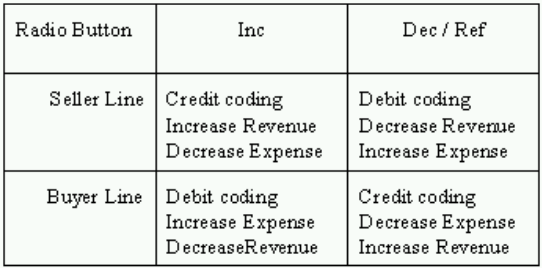
Occasionally agency personnel have questions on when to use the increase, decrease, or refund
radio buttons. The increase, decrease, and refund radio buttons were designed based on the
assumption that the seller is recording revenue, and the buyer is recording an expense. The
following is a summary of how various accounts are affected on the seller and buyer lines when
the increase (Inc), decrease (Dec), or refund (Ref) radio buttons are selected:
Most incorrect adjusting entries occur when both the seller and buyer lines are processed to the
same type of coded. For example, a department wants to move some expenses from object 6141
Administrative Services to object 6136 Postage and Mailing. The department has two options to
correctly move the expense. The first is to leave the radio buttons on Inc and enter 6136 on the
buyer line to increase the expense and enter 6141 on the seller line to decrease the expense. The
second option is to select the Dec radio button and enter 6136 on the seller line to increase the
expense and enter 6141 on the buyer line to decrease the expense.
During fiscal yearend closing, which begins July 1 and runs till the old year is closed, enter the
accounting period and fiscal year for the IAT. The old year posting date will depend on the
number of days remaining before closing. If an IAT is an old year transaction and is processed
after June 30, FINET checks to see if the IAT transaction is between GAAP accounting funds.
GAAP funds are designated by the category roll-up on the Fund Table.
FINET creates accrual entries if the fund categories are different. Entries to due to other funds or
due from other funds as appropriate are created to offset the coding line entered on the
transaction.
The following is a summary of the system offset accounts FINET uses when the seller and buyer
funds are NOT in the same category and the IAT is processed in old year after July 1.

Procedures
Responsibility
Action
Seller Department
Enter accounting information on the Seller IAT Detail Table. See the
Internal Transactions – Seller IAT Detail Table policy in this
section of this manual for more instructions. Obtain from the buyer
one or more lines of valid account coding for the transaction. Enter at
least one valid seller and one valid buyer line.
After adding all lines and correcting any errors, apply approvals.
Seller approval applies to all seller lines. The Buyer Table is not
created until the seller applies approvals. Once the buyer makes
changes or approves the IAT, the seller will be unable to alter any
information. The system will assign a posting date of 20 days after
the seller approval date. The IAT processes on this date even if the
buyer department does not approve the transaction
Print a hard copy of the transaction and file within the seller
department.
Buyer Department
Before the posting date, access the buyer side of the IAT using the
Buyer IAT Detail Table or the Buyer IAT Summary Table. See the
Internal Transactions – Buyer IAT Detail/Summary Table policy
in this section of this manual for more instructions. Add, delete, or
modify the buyer accounting information or distribute the coding
information to the correct object, revenue source, or balance sheet
account. The buyer cannot change the total. Contact the seller if there
is a problem with the amount.
Complete modifications to the IAT before the processing date. Apply
approvals to each buyer line. The transaction will post on the
processing date even if the buyer has not approved it.
Print a copy of the transaction and file within the buyer department.
Division of Finance
Initiate the JV creation program that loads the IAT into the
Document Listing. Process the JV transactions during the
nightly cycle